
UX Case Study: Selfie Verification for Plenty of Fish
Overview
I designed a selfie verification feature for Plenty of Fish to combat fake profiles and build user trust through a seamless, privacy-focused experience that increased verified profiles by 25% within 3 months.
Role: Senior UX Designer, Trust & Safety
The Problem
Users couldn’t distinguish real profiles from fake ones, leading to safety concerns and decreased engagement.
How might we verify user authenticity without creating unnecessary friction or privacy concerns?
Research & Insights
· 68% of users worried about fake profiles
· Manual reporting was reactive and slow
· Users wanted verification but were concerned about facial recognition privacy
· Competitors used verification badges successfully
User Quote: “I never know who’s real. I wish there was a way to tell.”
Design Process
1. Strategy & Goals
· Increase user confidence in matches
· Reduce fake accounts proactively
· Maintain strict privacy standards
· Keep verification under 90 seconds
2. User Flow
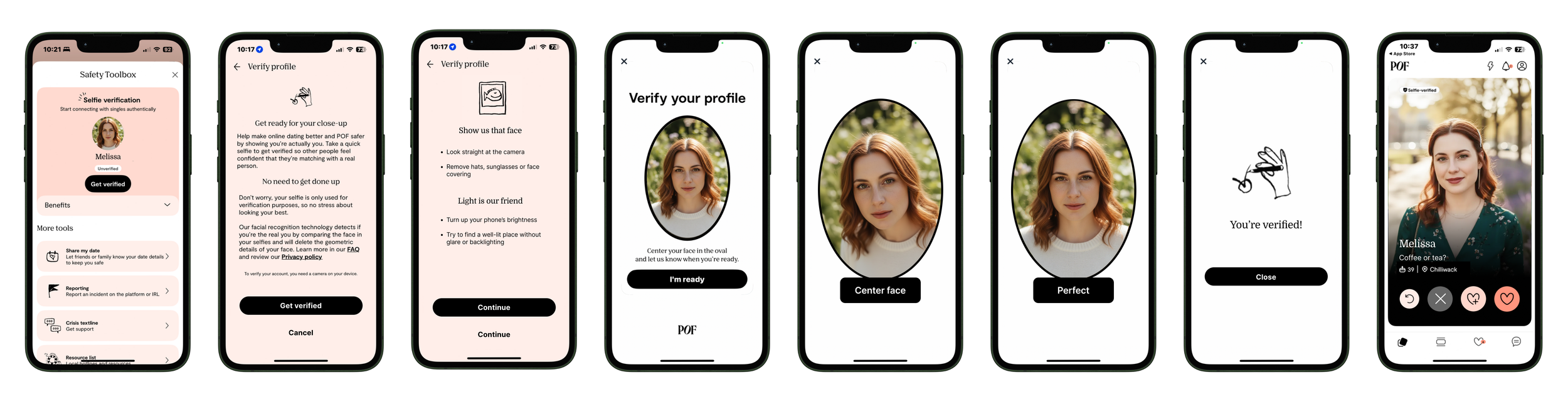
I designed a 4-step process that balanced security with simplicity:
1. Value & Consent → Clear benefits + privacy assurance
2. Preparation → Visual guidelines for perfect selfie
3. Capture → Real-time feedback during video selfie
4. Result → Instant badge or helpful retry guidance
3. Key Design Decisions
· Privacy-First Messaging: Explicitly stated “Your selfie is deleted immediately after verification”
· Progressive Disclosure: Technical details available but not overwhelming
· Clear privacy messaging: Simple explanation of feature and links to full privacy policy before entering flow
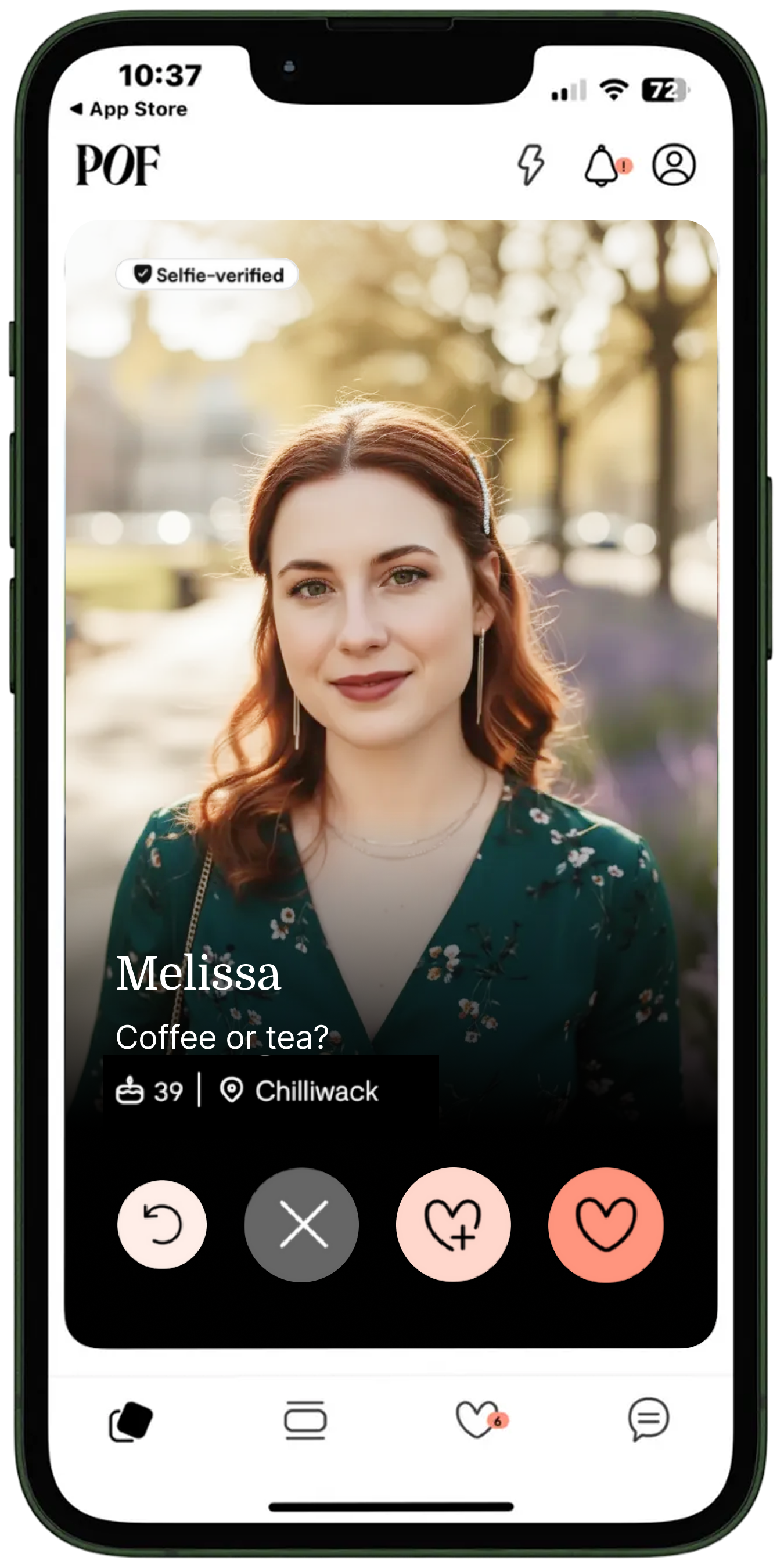
· Clear Badge System: Prominent verification indicator on profiles
4. Visual Design
· Universal symbols and clear naming: Selfie verification name in badge with shield icon
· Badge Placement: On image in swipe stack
· Micro-interactions: Smooth animations during processing
· Accessibility: Screen reader support and high contrast mode
5. Challenges & Solutions
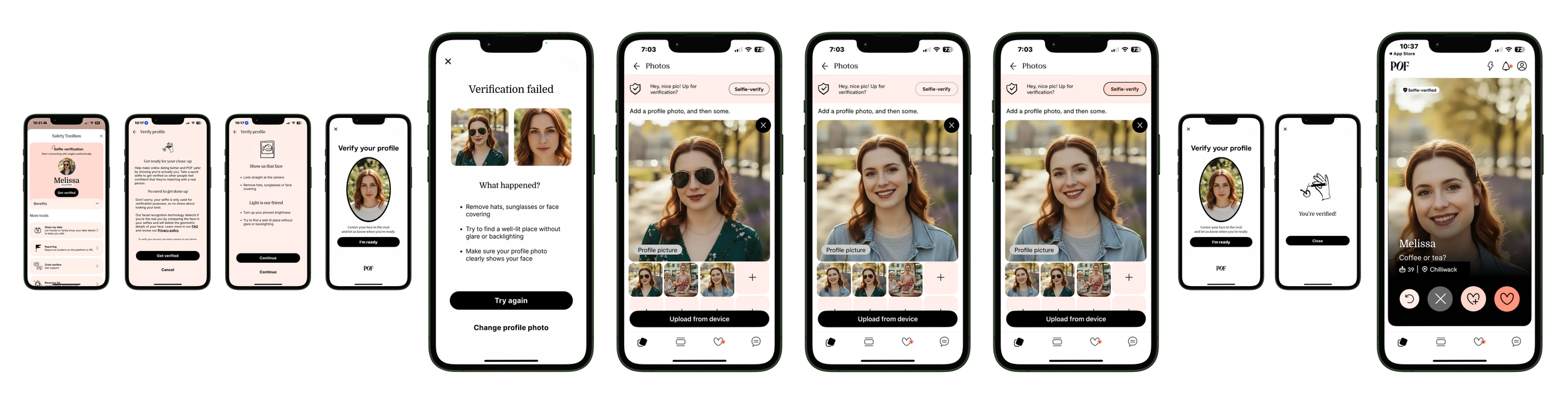
High failure rate (47% initially) Added help documentation
Privacy concerns Transparent data handling messaging
Technical limitations on older devices Created web-based fallback option
False rejections Implemented specific retry guidance
6. Results & Impact
Quantitative Results (3 Months Post-Launch):
· 25% increase in verified profiles
· 40% reduction in fake profile reports
· 15% higher response rates for verified users
· 72-second average verification time
· 4.2/5 user satisfaction score
7. Qualitative Feedback:
“Finally feel like I’m talking to real people” – Male, 29
“The process was surprisingly easy and clear” – Male, 42
“I trust profiles with the badge much more” – Female, 33
What I Learned
1. Privacy transparency drives adoption – Clear messaging increased completion rates
2. Failure states need as much design attention as success – Specific retry guidance reduced abandonment
3. Social proof is powerful – Seeing verified badges motivated others to verify
4. Security and UX can coexist with thoughtful design decisions
Reflection: This project taught me that trust in digital spaces is built through both technical verification and transparent user experience. By making privacy protections visible and the verification process valuable, we transformed a security requirement into a user-desired feature that genuinely improved platform safety.
Tools: Figma, UserTesting, Jira
Methods: User interviews, prototyping, usability testing, A/B testing